
Download Write.as – Blog, Privacy, Anonymous, Secure, Desktop
Overview
Write.as is a privacy-focused blogging platform designed for users who value anonymity and data protection. The software enables instant writing and publishing without requiring a sign-up, making it ideal for individuals who want to share thoughts, ideas, or creative content without leaving a digital footprint. Posts are private by default and only accessible to those with the direct link, ensuring that no third parties can discover or track them. The developer, Write.as, emphasizes transparency by not collecting any data unless explicitly provided by the user, such as IP addresses or location details.
Target users include writers, journalists, activists, and privacy-conscious individuals who need a simple, secure way to publish content online. The software is particularly useful for sharing sensitive material, personal reflections, or experimental writing without fear of surveillance or data harvesting. Real-world scenarios include creating anonymous opinion pieces, publishing research notes, or maintaining a private journal with public access via shareable links.
The desktop application version supports both Windows and Mac, offering a streamlined experience for users who prefer a dedicated environment over browser-based tools. With recent updates adding multilingual support and improved stability, Write.as continues to refine its usability while maintaining core principles of privacy and simplicity.
Key Features & Capabilities
- Anonymous Publishing: Create and publish blog posts without registration. Only the link to your post is shared, ensuring complete privacy.
- Privacy-First Design: The platform does not collect IP addresses, location data, or other personal information unless explicitly provided by the user.
- Post Unpublishing: Remove a published post from the web while preserving the URL for future reuse, offering flexibility in content management.
- Real-Time Autosave: Drafts are automatically saved, reducing the risk of losing work during writing sessions.
- Multilingual Support: Recent versions include translations in Spanish, Portuguese, and Vietnamese, expanding accessibility for non-English speakers.
- Improved UI Navigation: Enhanced settings organization, better state indicators for published and draft posts, and a fixed back button for smoother workflow.
- Copy Post Details: Easily copy post metadata like URL, title, and publish date from the View Details dialog for sharing or documentation.
- RTL Support: Full right-to-left language compatibility for Arabic, Hebrew, and other RTL scripts.
These features cater to users seeking a lightweight yet powerful tool for content creation with minimal friction. The ability to unpublish posts allows writers to edit their public narratives without permanent records, while the lack of sign-up requirements removes barriers to entry. The addition of language translations reflects a growing commitment to inclusivity, enabling users from diverse linguistic backgrounds to participate without language limitations.
User Interface, Workflow & Performance
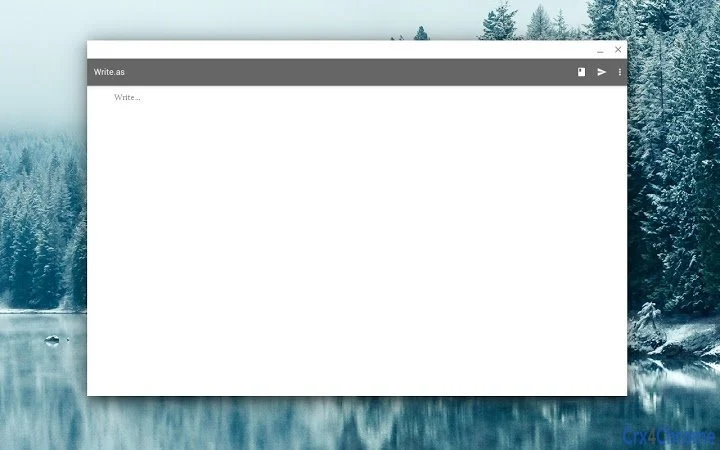
The user interface of Write.as is minimalistic and focused on the writing experience. The main window presents a clean text editor with a toolbar for basic formatting and post management. Navigation is straightforward, with clear indicators for draft and published states, helping users track their content status at a glance.
Workflow efficiency is enhanced by features such as real-time autosave, which ensures that no writing is lost due to crashes or accidental closures. The ability to resize the window and the unmaximized startup state provide flexibility in workspace configuration, particularly useful for multitasking users.
Performance observations are based on general software behavior patterns. The application is designed to be lightweight, with a reported size of 100MB, suggesting efficient resource usage. However, exact performance details such as CPU or RAM consumption were not specified by the developer. Stability improvements in recent versions, including fixes for crashes after deleting the last post and issues with toolbar actions, indicate ongoing optimization.
Overall, the interface prioritizes simplicity and speed, making it easy for users to start writing immediately. The lack of complex menus or settings reduces cognitive load, allowing users to focus on content creation rather than software mechanics.
Compatibility & System Requirements
Write.as is available for both Windows and Mac operating systems, making it accessible to a broad range of desktop users. The software version is 1.3.6, with a file size of 100MB, which suggests a compact installation package suitable for most modern machines.
Exact system requirements were not listed by the developer. Compatibility information is limited to the supported platforms. The developer did not provide additional system requirements, such as minimum RAM, processor speed, or disk space beyond the total size.
Installation is straightforward, and the application runs as a standalone desktop client. Users can expect consistent behavior across both operating systems, given the cross-platform nature of the software. No specific hardware requirements were mentioned, so users are advised to ensure their system meets general standards for running modern desktop applications.
Pros and Cons
Pros
- Anonymous publishing with no sign-up required
- Strong privacy focus — no data collection beyond user-provided information
- Support for multiple languages including Spanish, Portuguese, and Vietnamese
- Ability to unpublish posts while retaining the URL
- Real-time autosave and improved draft reliability
- Lightweight design with a 100MB file size
- Right-to-left (RTL) language support for inclusive global use
Cons
- Exact system requirements not disclosed by the developer
- Limited customization options in the interface
- No built-in collaboration or commenting features
- Dependent on external web service for content hosting
- Offline functionality not explicitly confirmed
FAQ Section
Is Write.as available for Windows and Mac?
Yes, Write.as is compatible with both Windows and Mac operating systems.
Is the software free to use?
Yes, Write.as is available at no cost. There are no subscription fees or premium tiers required to access core features.
Can I use Write.as offline?
The developer did not specify whether the application supports offline functionality. Content is published through a web service, so an internet connection is required for publishing and syncing.
What type of license does Write.as use?
The licensing model is not publicly detailed. However, the software is distributed freely, suggesting an open or permissive license.
How often are updates released?
Updates are released regularly, with version 1.3.6 released on April 15, 2024. Recent versions have included new language translations and stability fixes, indicating ongoing development and maintenance.
Final Thoughts + CTA
Write.as stands out as a compelling choice for users who prioritize privacy and simplicity in their digital writing. With its anonymous publishing model, no sign-up requirement, and strong commitment to user data protection, it fills a niche for those who need a secure, straightforward blogging tool. The addition of multilingual support and improved UI stability demonstrates a thoughtful approach to user experience and accessibility.
While the software lacks advanced collaboration tools and offline capabilities, its core strengths—privacy, ease of use, and minimalism—make it ideal for individual writers, journalists, and privacy advocates. The ability to unpublish posts while keeping the URL offers a unique advantage over traditional platforms.
For anyone seeking a secure, no-frills way to write and publish online, Write.as delivers on its promise. Download Write.as now to experience a private, anonymous, and powerful writing environment.







